Accessories
Remote Indicator
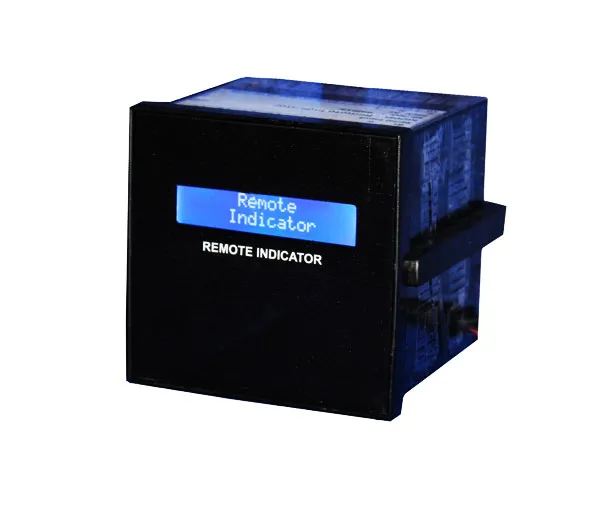
The Accumax Remote Indicator is a secondary panel display for the Accumax electromagnetic flow meter. Because it communicates over RS485 it can be panel-mounted around 1000 metres from the meter itself, putting the reading where the operator is rather than where the pipe is. It runs on a 220 V AC SMPS supply, fits a 96 x 96 panel enclosure, and multiple displays can be connected.
Features
-
Secondary display for Accumax flow meters
Designed as the secondary display for the Accumax electromagnetic flowmeter, easy to integrate with Accumax brand meters.
-
RS485 serial communication
Communication is RS485 based, with a stated 1 km range.
-
Long-distance panel mounting
Can be mounted on a panel around 1000 metres away from the flow meter.
-
96 x 96 panel enclosure
Standard 96 x 96 enclosure format; overall 96 x 96 x 102 mm.
-
SMPS based power supply
Runs on 220 V AC through an SMPS supply.
-
Multiple displays supported
More than one remote display can be connected.
-
Output display and indicator
Provides an output display with indicator.
Frequently asked questions
How far from the flow meter can the remote display be mounted?
Around 1000 metres. The RS485-based communication gives a stated range of 1 km.
What power supply does the Remote Indicator need?
220 V AC, through an SMPS based power supply.
What size is the unit and what panel format does it use?
It uses a 96 x 96 enclosure, with overall dimensions (L x W x H) of 96 x 96 x 102 mm.
Can I connect more than one remote display to a single flow meter?
Yes. Multiple displays can be connected.
Which meters does it work with?
It is the secondary display for the Accumax electromagnetic flowmeter and is easy to integrate with Accumax brand meters.
How is it wired up?
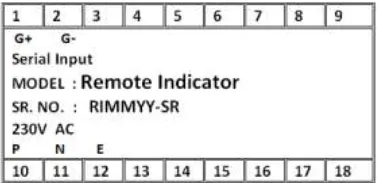
Power terminals are P (phase), N (neutral) and E (earth). The serial terminals are G+ for RS485 Serial + and G- for RS485 Serial -.
Gallery
Need help specifying the right instrument?
Tell us the fluid, line size and accuracy you need. Our engineers will recommend a configuration and quote it.