Flow Controllers
Batch Controller
Batch Controller (MODBUS RS485)
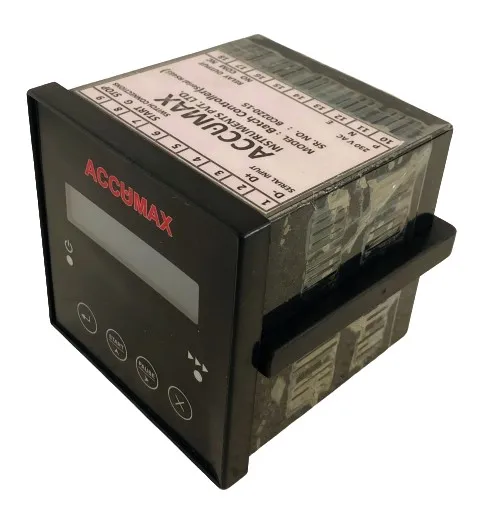
The Accumax Batch Controller lets an operator program a batch volume and run it to completion. It is configured by push button under password protection, and is used where error-free, accurate, controlled batching is needed. It communicates with flow measuring devices over RS 485 Modbus and provides a relay output plus terminals for external start and stop switches.
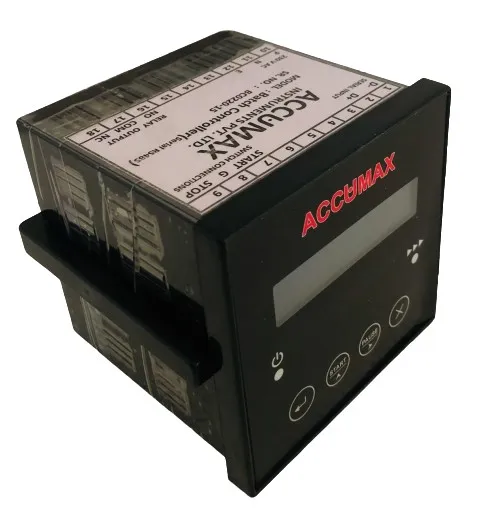
Features
-
RS485 Modbus serial communication
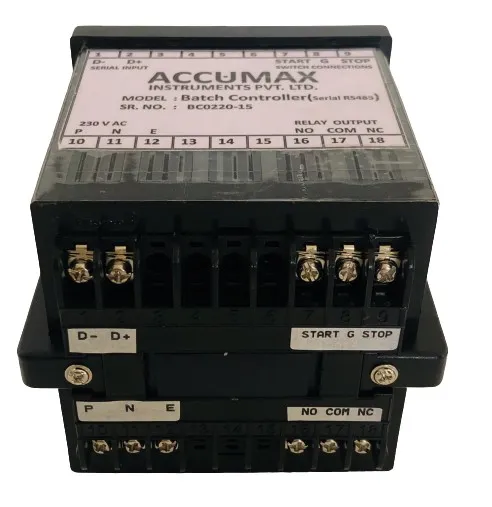
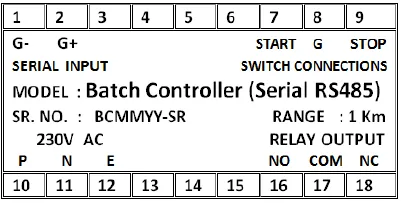
Wired via the D+ and D- terminals.
-
Completes batch even in power interrupt
Resume capability in case of power interrupt.
-
Relay output
Brought out on NO / NC / COM terminals.
-
External push-button provision
Provision for external switches to start and stop the batch (START and STOP terminals with G as the common).
-
Password-protected batch programming
The user can program batching volume with password protection.
-
Five operating modes
Source says it 'can operate using 5 modes'. The five modes are not named on the page.
-
Easy front-panel setup
Display and push-button configuration to select liquid quantity and unit.
Technical specifications
19 values · 7 groups
These values are transcribed from the manufacturer's datasheet and are pending engineering sign-off. Confirm critical figures with Accumax before specifying.
| Identification (nameplate) | |
|---|---|
| Model (as printed on nameplate) | Batch Controller (MODBUS RS485) |
| RANGE (as printed on nameplate; the PDF does not say what quantity this ranges over) | 1 Km |
| Communication | |
| Serial communication | RS485 Serial communication |
| MODBUS terminals | D+: RS485 MODBUS (+), D-: RS485 MODBUS (-) |
| Electrical | |
| Mains terminals | P: Phase, N: Neutral, E: Earth |
| Relay output terminals | NO/NC/COM |
| External switch terminals | START: Push switch for start batch; STOP: Push switch for stop batch; G: common terminal for switch |
| Measurement | |
| Selectable input units | L/S, L/M, L/H, KL/S, KL/M, KL/H, KG/S, KG/M, KG/H |
| Operation and control | |
| Operating modes | Can operate using 5 modes — Totalizer, Batcher, Flow comparator, Rate Switch, Pulsar |
| Functionality | A complete flow controller/monitor functionality |
| Power-interrupt behaviour | Completes batch even in power interrupt |
| External control | External Push button provision |
| Settings security | Password protected settings |
| Configuration password | 1111 — Basic configuration |
| Batch order (Batcher mode) | INC / DEC |
| Display and interface | |
| Display | LCD Display |
| Front-panel switches | Menu/Enter, Increment/Start, Shift/Stop, Cancel |
| Testing and calibration | |
| Burn-in | subject to at least 24 hour burn-in operation cycle |
| Factory calibration | supplied from the manufacturing plant calibrated |
Sources: UFC1, NEW_BATCH_CONTROLLER
4 further specification s are listed in the datasheet but not reproduced here
These labels appear in the datasheet, but the value beside them could not be read reliably from the document. Rather than print a figure we cannot stand behind, we have left them out — ask us and we will confirm them directly.
- "5.1 Version 1." — the hardware-connection version number after "Version 1." is lost (NEW_BATCH_CONTROLLER; UFC1 shows "Version 1.0" for its second variant)
- Switch numbering — only "Switch1" keeps its number; the numbers for the Increment/Start, Shift/Stop and Cancel switches are lost (NEW_BATCH_CONTROLLER, UFC1)
- "SR" (serial-number field) on the Batch Controller nameplate — only the template-looking string "BCMMYY" survives beside it (UFC1)
- Terminal numbers 10–18 appear on the nameplate diagrams with no function labels attached (UFC1)
Applications
- Chemical industries
- Food and sugar industries
- Pharmaceutical industries
- Textile industries
- Ceramic industries
- Paper mills
- Industrial R.O.
- Water supply schemes
- Sewage treatment plants
Frequently asked questions
Can the batch be started and stopped from external buttons?
Yes. There is provision for external switches to start and stop the batch, wired to the START and STOP terminals with G as the common terminal for the switch.
What happens to a running batch if the power fails?
It completes the batch even in a power interrupt - the controller has resume capability in case of power interrupt.
Can operators be stopped from changing the batch volume?
Yes. The user can program batching volume with password protection.
How does it connect to the flow meter?
Over RS485 Modbus, using the D+ and D- terminals.
Gallery
Related products
Dosing Controller
Volume-based dosing controller that acts on a preset quantity, with RS 485 link and timer setup.
View details
Flow Comparator
Compares inlet vs outlet flow from two sensors and alarms on the inlet-to-outlet recovery rate.
View details
Flow Control Switch
Panel flow controller with twin relays for minimum and maximum flow, RS485 and password-protected setup.
View details
Need help specifying the right instrument?
Tell us the fluid, line size and accuracy you need. Our engineers will recommend a configuration and quote it.